


The Complete Guide to Image Search Techniques Master Visual
Finding the right photo online shouldn’t feel like searching for a needle in a haystack. Whether you’re tracking down the source of a viral image, shopping for that perfect outfit you saw on social media, or verifying if a news photo is authentic, knowing the right image search techniques makes all the difference
This guide walks you through everything from simple searches to advanced reverse image search techniques, helping you become a visual detective in your own right
Why Image Search Skills Matter Today
We live in a visual-first world. Every day, billions of images circulate across social platforms, messaging apps, and websites. But here’s the challenge: how do you find where an image came from? How do you verify if it’s real? Or maybe you have a photo of something you love, a piece of furniture, a travel destination, a unique plant, but you have no idea what it’s called or where to find it.
That’s where solid image search technology comes in. It’s not just about finding pretty pictures anymore. It’s about fact-checking, shopping smarter, protecting your digital identity, and satisfying genuine curiosity
Getting Started: The Basics Everyone Should Know
Your First Image Search
If you’ve ever wondered how to image search something, the good news is that modern tools make it incredibly straightforward. Most people start with Google Images, and for good reason, it’s powerful, free, and surprisingly intuitive.
Here’s the simplest approach: head to Google Images, click the camera icon in the search bar, and upload a photo from your device. Within seconds, you’ll see where that image appears across the web, plus visually similar results. It’s genuinely that simple.
But here’s where basic image search gets interesting. The real skill isn’t just performing the search, it’s knowing what to do with the results. Are you looking for the source? A higher resolution version? Similar items to purchase? Your goal shapes how you interpret what you find.
Understanding What Happens Behind the Scenes
Ever stop to think about how image search works? It’s actually fascinating. When you upload a photo, search engines don’t just “look” at it the way humans do. Instead, they analyze patterns, shapes, colors, textures, and even the arrangement of elements within the image. They convert these visual elements into data points, then compare them against billions of indexed images.
This process happens in milliseconds, thanks to sophisticated machine learning models that have been trained on massive visual datasets. The technology keeps improving, which means today’s results are significantly more accurate than even a few years ago
The Power of Reverse Searching
What Makes Reverse Image Search Special?
Let’s talk about one of the most underutilized tools on the internet: reverse image search techniques. Unlike regular searches, where you type words to find pictures, this flips the script. You start with the image and work backwards to discover its story.
So, what does reverse image search do exactly? Imagine you receive a photo via WhatsApp with a dramatic news claim attached. Instead of taking it at face value, you can upload it to a reverse search tool and potentially discover:
- The original context and source
- Whether it’s been digitally altered
- How long has it been circulating online
- If reputable news outlets have used it (and in what context)
Understanding how reverse image search works empowers you to verify information before sharing it, a crucial skill in today’s misinformation landscape.
Real-World Applications
Journalists use the reverse image technique daily to verify user-generated content. Online sellers use it to check if competitors are stealing their product photos. Artists use it to find unauthorized use of their work. Everyday people use it to identify mystery objects, find similar products to buy, or reconnect with old friends through photos
If you’re investigating how to image search someone, perhaps to verify an online dating profile or reconnect with someone from your past, reverse searching can help, though always respect privacy boundaries and legal limitations. The technology is powerful, but with that power comes responsibility
Practical Tutorials: Learning by Doing
Step-by-Step: Finding Similar Images
One of the most common needs is learning how to search for an image to find similar images. Maybe you have a low-resolution photo and need a crisp, print-quality version. Or perhaps you love a particular artistic style and want to discover more like it
Here’s a practical image search tutorial:
Step 1: Choose Your Starting Point
Select the clearest, most distinctive portion of your image. If it’s a group photo but you’re interested in one person, crop to focus on them. If it’s a product against a busy background, try to isolate the item itself
Step 2: Select the Right Tool
Google Images works for most purposes, but don’t overlook alternatives. TinEye excels at finding exact matches, even if the image has been resized or slightly edited. Yandex often surfaces results that Google misses, particularly for Eastern European content
Step 3: Analyze Results Critically
Don’t just click the first result. Look at the context. Is this the source? Has the image been cropped, filtered, or altered? Check multiple results to build a complete picture
Step 4: Refine Your Approach
If initial results disappoint, try searching different crops of the same image. Sometimes zooming in on a distinctive detail, a logo, a landmark, or a unique pattern yields better matches than the full composition
Using Text and Images Together
Modern search allows sophisticated combinations. Learning how to image search with keywords means you can upload a photo AND add descriptive text to refine results. For example, upload a photo of a dress and add “blue floral summer dress under $100” to narrow shopping results
Similarly, how to search images by text helps when you know what you want but don’t have a sample image. Describe it in detail: “mid-century modern walnut coffee table with tapered legs.” The more specific your description, the better the results
Platform-Specific Mastery
Google Image Search: Tips from the Pros
Google dominates visual search for good reason. Their Google image search technology leverages the company’s massive indexing capabilities and AI expertise. But most users barely scratch the surface of what’s possible
Essential Google image search tips:
Filter by Usage Rights
Click “Tools” then “Usage rights” to find images labeled for reuse. This is crucial for bloggers, marketers, and content creators who need legally safe visuals
Search by Exact Dimensions
Need a specific size? After your initial search, click “Tools,” then “Size,” then select “Exactly” to input precise pixel dimensions. This answers the common question about how to Google image search specific resolution, perfect when you need images that fit specific design requirements without cropping or distortion
Discover the “Visually Similar” Panel
After searching, scroll to find panels showing related images. This often reveals variations, different angles, or context you hadn’t considered.
Advanced Google Image Search Tricks
Beyond the basics, Google image search tricks include:
- Color filtering: Looking for images dominated by specific colors (great for design projects)
- Time filtering: Finding recently uploaded images to get the latest versions
- Type filtering: Searching specifically for faces, clip art, line drawings, or animated GIFs
These features transform casual searching into professional-grade research.
Exploring Yandex and Beyond
While Google leads globally, Yandex image search tips reveal why Russia’s search engine deserves attention. Yandex frequently outperforms Google for:
- Facial recognition accuracy
- Finding images from Russian and Eastern European sources
- Identifying products and locations with less Western-centric bias
The visual image search Google provides is excellent, but smart researchers check multiple engines. Each has strengths based on its indexing priorities and regional focus
Specialized Search Scenarios
Shopping and Fashion Discovery
“Can you image search clothes?” Absolutely, and it’s transforming retail. See a jacket you love on Instagram, but no product tag? Screenshot it and search. You’ll likely find:
- The exact item from multiple retailers
- Similar styles at different price points
- Customer reviews and styling inspiration
- Availability and sizing information
This visual image search engine capability bridges the gap between inspiration and purchase, making “see it, want it, buy it” genuinely seamless.
Professional and Investigative Uses
Learning how to image search a person has legitimate applications, such as journalists verifying sources, families reconnecting through old photos, or professionals confirming conference speakers’ identities. However, this power requires ethical handling. Always consider:
- Privacy rights and consent
- Potential for stalking or harassment
- Legal restrictions in your jurisdiction
- The accuracy of facial recognition (it’s not infallible)
Academic and Technical Research
For researchers, image retrieval’s current techniques, promising directions, and open issues represent a fascinating field. Current innovations include:
- Fuzzy image search: Finding matches even when images are partially obscured, low quality, or digitally altered
- Cross-modal search: Combining visual, textual, and audio cues
- Real-time video frame extraction: Searching within video content as easily as static images
These advances push the boundaries of how we interact with visual information
Understanding Search Methodologies
Different Approaches for Different Needs
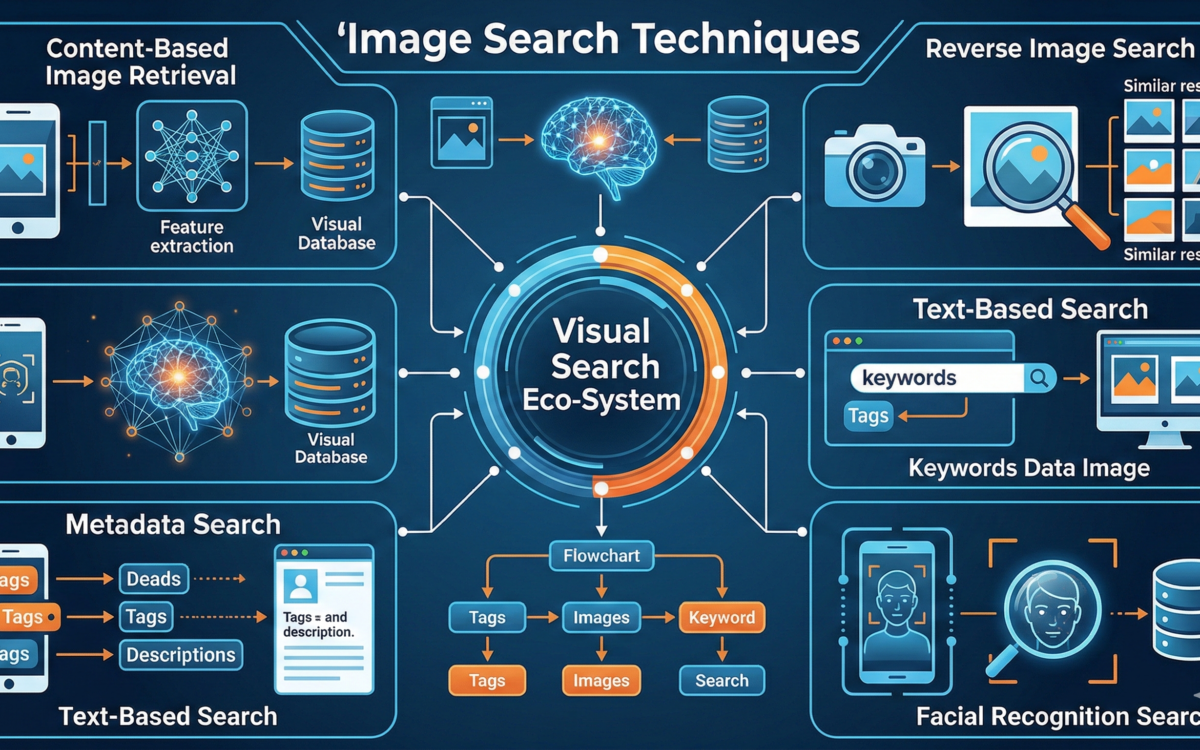
Professional researchers recognize that 3 search techniques form the foundation of effective visual discovery:
- Content-based: Analyzing the actual visual elements, colors, shapes, and textures
- Metadata-based: Using accompanying text, tags, and file information
- Concept-based: Understanding what the image represents conceptually, not just visually
Expanding to 4 search techniques, we add hybrid approaches that intelligently combine multiple strategies. The best modern engines don’t rely on a single methods they layer them for accuracy.
Understanding 5 search methods and 6 search patterns (including circular, spiral, and zone approaches adapted from forensic investigation) helps when automated tools fall short. Sometimes, manual, systematic searching across specific domains yields what algorithms miss.
The 6 types of search patterns used in investigation, link, line, grid, zone, spiral, and circular, can be adapted for comprehensive digital image research when you need to be thorough rather than fast
Quality, Ethics, and Best Practices
Ensuring Result Quality
Not every result deserves your trust. Image search quality varies significantly based on:
- Source authority: Established institutions generally provide more reliable context than anonymous uploads
- Image integrity: Look for signs of manipulation, unnatural shadows, inconsistent lighting, or artifacts from editing
- Recency: Older images may lack current context or may have been repurposed misleadingly
- Cross-verification: Multiple sources confirming the same information increase confidence
The Psychology of Visual Search
Search image psychology reminds us that we don’t just search for pictures—we search for meaning, validation, and connection. Understanding your own motivations helps refine your approach. Are you seeking facts, inspiration, confirmation, or something else? This awareness shapes how you evaluate what you find.
Responsible Searching
When you use an image to search internet databases, remember that behind every photo is a creator with rights. Ethical practices include:
- Checking licensing before reuse
- Crediting sources appropriately
- Respecting privacy, especially for personal photos
- Verifying context before drawing conclusions or sharing findings
Troubleshooting and Advanced Solutions
When Standard Searches Fail
Sometimes you encounter reverse image search 0 matches. Don’t give up. Try:
- Cropping different regions of the image
- Converting between formats (JPG to PNG, for example)
- Searching with descriptive text added
- Trying specialized engines for your specific domain (academic, medical, historical)
Format-Specific Considerations
Different file types behave differently in search engines. JPG image search engine optimization often yields the broadest results since JPG remains the web standard. However, JPG image search and JPG image search can sometimes return slightly different results due to how engines process metadata. It’s worth trying both if you’re thorough
The Future of Visual Discovery
Emerging Technologies
The next wave of image search technology promises exciting developments:
- 3 search techniques are evolving into multimodal systems that understand video, audio, and text simultaneously
- D image search (dimensional/spatial search) will let us search within 3D spaces and virtual environments
- Augmented reality integration will enable real-time visual identification through smartphone cameras
Community and Collaborative Tools
The image search tool of Reddit communities demonstrates the power of human expertise complementing algorithms. Subreddits like r/HelpMeFind or r/WhatIsThisThing regularly solve mysteries that automated searches cannot. Sometimes crowdsourced human knowledge outperforms even sophisticated AI
Building Your Ultimate Search Toolkit
Creating Your Personal System
The ultimate image search strategy combines multiple tools and approaches:
For Quick Checks: Google Images or Bing Visual Search
For Exact Matching: TinEye
For Comprehensive Coverage: Yandex + Google combined
For Shopping: Pinterest Lens or Amazon’s visual search
For Professional Verification: Multiple engines plus manual source checking
Continuous Learning
Image search tips and capabilities evolve constantly. Stay current by:
- Following technology blogs covering search innovations
- Testing new features when platforms announce updates
- Sharing knowledge with communities of practice
- Practicing regularly to maintain sharp skills
Conclusion
From learning image search how to do basic queries to mastering sophisticated reverse image search methods, developing these skills pays dividends across personal, professional, and creative endeavors.
The ability to use images to search in Google and beyond represents more than technical proficiency; it’s about navigating our visual culture with confidence and critical thinking. Whether you’re applying Google image search tutorial basics or exploring cutting-edge visual search techniques, the fundamental goal remains: connecting with information that matters.
As image search machine learning continues advancing, the gap between “I wonder and “I found out shrinks ever further. The tools are here. The knowledge is in your hands. Start searching smarter today