

How to Use an AI Agent to Sort Emails Effortlessly
Imagine waking up, grabbing your morning coffee, and opening your laptop to find an inbox that is perfectly organized.
No inbox clutter, no spam, and no overwhelming wall of unread messages. Instead, your most important emails are sitting right at the top, while newsletters and promotions have been tucked away in their own neat folders.
This isn’t just a dream for busy professionals; it is the reality for anyone who knows how to use an AI agent to sort emails. In our fast-paced world, email overload has become a modern-day epidemic.
We spend hours every week on email triage, which is just a fancy way of saying we are sorting through digital piles of paper. But with the rise of Artificial Intelligence (AI), specifically the AI Agent, we finally have a way to fight back.
In this guide, we will explore how you can transform your email account into a productivity powerhouse.
We will look at the tools, the technology like Natural Language Processing (NLP) and Machine Learning (ML), and the simple steps you can take to make email management feel effortless.
What Exactly is an AI Email Agent?
Before we dive into the how, let’s talk about the what. An AI Agent for email is much more than a simple email filter.
Traditional filters are like old-fashioned sorting machines; they only look for specific words or sender addresses.
If you tell them to put anything with the word Invoice into a folder, they will, but they might also accidentally move a personal email from a friend talking about their invoice for a new car.
The Brains Behind the Sorting: NLP and ML
To understand how these agents work, we have to look at two key entities:
- Natural Language Processing (NLP): This is the technology that allows a computer to understand human language. It analyzes the subject line and the body of the incoming email to figure out if it’s a meeting request, a customer inquiry, or just another cold email.
- Machine Learning (ML): This is how the agent gets smarter over time. By looking at your email history, the AI model learns your email habits. If you always ignore emails from a certain email marketing list but immediately respond to your team members, the agent will start to prioritize those internal communications automatically.
Why You Need an AI Assistant for Your Inbox
You might be thinking, I’ve managed my emails manually for years. Why change now? The answer lies in efficiency and productivity.
1. Stopping Email Overload
Email overload happens when the sheer volume of new emails exceeds your ability to process them. This leads to stress and context switching, the mental exhaustion that comes from jumping between different types of tasks.
An AI agent acts as a personal assistant, doing the email triage for you so you only see what matters.
2. Enhancing Work-Life Balance
When your email management is automated, you spend less time glued to your screen. AI automation ensures that high-priority items are flagged, while low-priority items wait for you.
This means you can actually close your laptop at 5:00 PM without worrying that you missed a critical email.
3. Better Customer Support
If you run a business, response time is a key metric. An AI-powered email system can draft replies to frequently asked questions instantly.
This improves your customer service and ensures that your sender reputation remains high because you are always responsive.
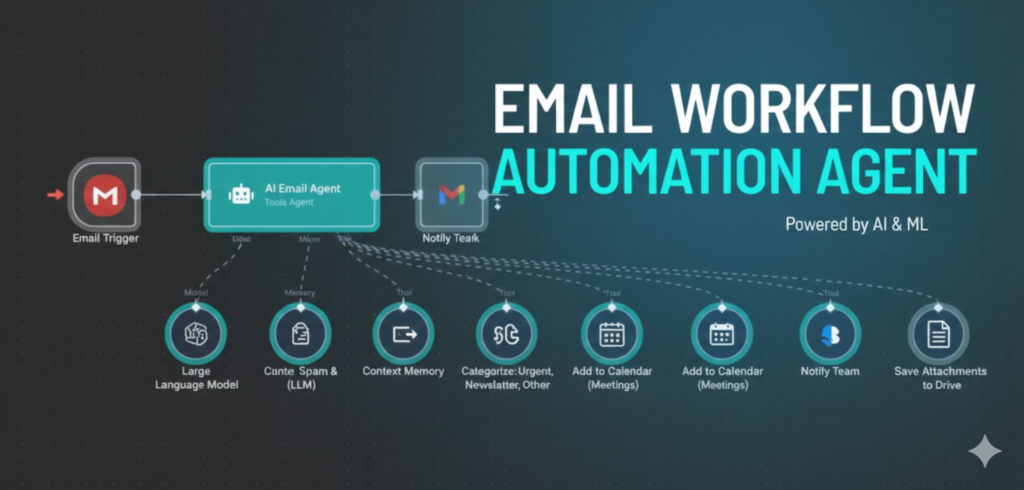
Step by Step: How to Use an AI Agent to Sort Emails
Ready to get started? Follow these simple steps to set up your own email automation system.
Step 1: Choose the Right Tool
First, you need to decide which AI tool fits your needs. Some are built directly into popular services, while others are third-party apps.
- Gmail & Outlook: These email services are adding more AI features every day, like Smart Compose and Priority Inbox.
- Specialized Assistants: Tools like Superhuman, SaneBox, or Shortwave offer advanced features specifically for inbox decluttering.
- Workflow Automation: Tools like Zapier or IFTTT allow you to connect your email to over 7,000 other apps for complex email workflows.
Step 2: Connect Your Account and Set Identity
Once you’ve picked a tool, you’ll need to link your email account. During the setup, you’ll often define the identity and persona of your agent.
- System Prompt: This is where you tell the AI how to behave. You might say, You are a professional assistant. Sort my emails into Urgent, Read Later, and Newsletters. Do not delete anything without asking.
- Brand Voice: If the agent will draft emails for you, you can teach it your brand voice, so it sounds just like a human wrote it.
Step 3: Create a Knowledge Base
For an AI agent to be truly helpful, it needs data sources. You can feed it related articles, project documents, or team member lists.
This knowledge base helps the AI assistant provide personalized insights when it suggests draft responses.
Step 4: Automate the Mundane Tasks
Now, set up your workflow automation. Here are a few ideas:
- Attachment Handling: Have the AI automatically save credit card receipts or invoices to a specific folder in the cloud.
- Task Management: Link your email to a task management tool. If the AI detects a meeting request, it can automatically create a task for you to check your calendar.
- Email Summarization: Use AI-powered search to summarize long email threads. Instead of reading 20 messages, the AI gives you a 3-sentence summary of the action items
Advanced Features: Making the Most of AI
Once you are comfortable with the basics, you can start using advanced features to truly master your inbox management.
- Sentiment Analysis: Some AI models can perform sentiment analysis. This means they can tell if an incoming email from a customer is happy, confused, or angry.
Angry emails can be moved to a high-priority folder so you can handle them immediately, while happy ones can be saved for a success stories folder. - Ghostwriter and Draft Generation: An AI email generator can draft responses based on your previous email history.
This Drafting responses feature is a huge time-saver. You just review the draft, make small edits, and hit send. It’s like having a copywriter sitting right next to you! - Real-Time Sorting: Unlike older systems that might only check your mail once an hour, modern AI agents work in real-time.
As soon as a new email hits the server, the agent classifies it. This ensures your priority inbox is always up to date.
Safety First: Data Privacy and Security
When you learn how to use an AI agent to sort emails, you must think about security. You are giving an AI tool access to your personal data and email communication.
- Data Protection: Always check if the tool is GDPR or HIPAA compliant, especially if you handle sensitive financial details or medical info.
- Encryption: Ensure the service uses advanced encryption to keep your email history safe from cybersecurity threats.
- No Credit Card Required Trials: Many of the best AI email assistants offer a free trial without needing a credit card up front. Use these to test the privacy settings before you commit.
Comparing the Best AI Email Tools for 2026
| Tool Name | Best For | Key AI Feature |
| Superhuman | High-volume power users | 100ms speed & Instant Reply |
| SaneBox | Inbox decluttering | SaneLater & SaneNews folders |
| Gmelius | Team collaboration | Shared inboxes & Meli assistant |
| Shortwave | Gmail users | Ghostwriter that learns your voice |
| Zapier Agents | Workflow automation | Connects email to 8,000+ apps |
Common Challenges and How to Solve Them
The AI is sorting my emails into the wrong folders
Don’t worry! This is part of the machine learning process. Most tools have a way for you to correct the AI.
When you move an email back to the correct folder, the AI model learns from its mistake. Over time, its accuracy will reach nearly 100%.
I’m worried the AI will sound like a robot
Modern language models are incredibly good at mimicking human brand voice. If you provide enough training data (like your sent folder), the draft responses will sound natural. You always have human oversight, so you can change anything before it’s sent.
I get too many newsletters
Use the Unsubscribe or Bulk Cleaner features. An AI agent can identify newsletters you haven’t opened in months and offer to unsubscribe you with a single click.
This is the ultimate inbox decluttering move!

The Future of Email: What’s Next?
As we look toward the future, AI email agents will only get smarter. We are already seeing the development of the Model Context Protocol (MCP), which will allow different AI tools to talk to each other more easily.
Imagine your email agent talking directly to your calendar agent and travel agent to book a whole trip based on one incoming email!
We will also see more Predictive Analytics, where your agent tells you, You usually get a lot of emails on Tuesday mornings; I’ve cleared your calendar so you can focus.
Conclusion
Learning how to use an AI agent to sort emails is one of the best things you can do for your productivity and mental health. By automating repetitive tasks, reducing context switching, and ensuring important messages are always seen, you turn a source of stress into a powerful tool.
Whether you opt for a simple priority inbox or a complex workflow automation system using Zapier, the goal remains the same: to spend less time in your inbox and more time on the work that matters.
So, why not start today? Sign up for a free trial of one of the best AI email assistants and see the difference for yourself. Your clean, organized inbox is waiting
FAQ
Will the AI agent read all my personal emails?
AI agents are designed with privacy in mind. They typically analyze the metadata and content only to perform the specific sorting tasks you’ve requested. Most reputable tools use enterprise-grade encryption to ensure your data remains confidential and secure
What happens if the AI sorts an important email into the wrong folder?
AI requires a brief “learning phase.” If an email is misplaced, simply move it manually to the correct folder. The system uses Machine Learning to observe your corrections and will adjust its accuracy for future incoming messages
Do I need to pay for an AI email sorting tool?
Many basic AI features are already integrated into free services like Gmail and Outlook. However, specialized tools with advanced features like automated drafting or complex workflow integrations usually require a monthly subscription. Most offer a free trial to test their utility first
Can the AI send emails on my behalf without me knowing?
By default, most AI assistants operate on a “human in the loop” model. They will generate a draft based on your instructions, but you must review and hit “Send” yourself. You maintain full control over your outgoing communications
Are these AI tools compatible with mobile devices?
Yes, most modern AI email assistants like Shortwave, Superhuman, and Spark have dedicated apps for both iOS and Android. Your sorting rules and folders will sync perfectly across your laptop and phone